
FiturFeatures

Angka yang penting, sekali lihatThe number that matters, at a glance

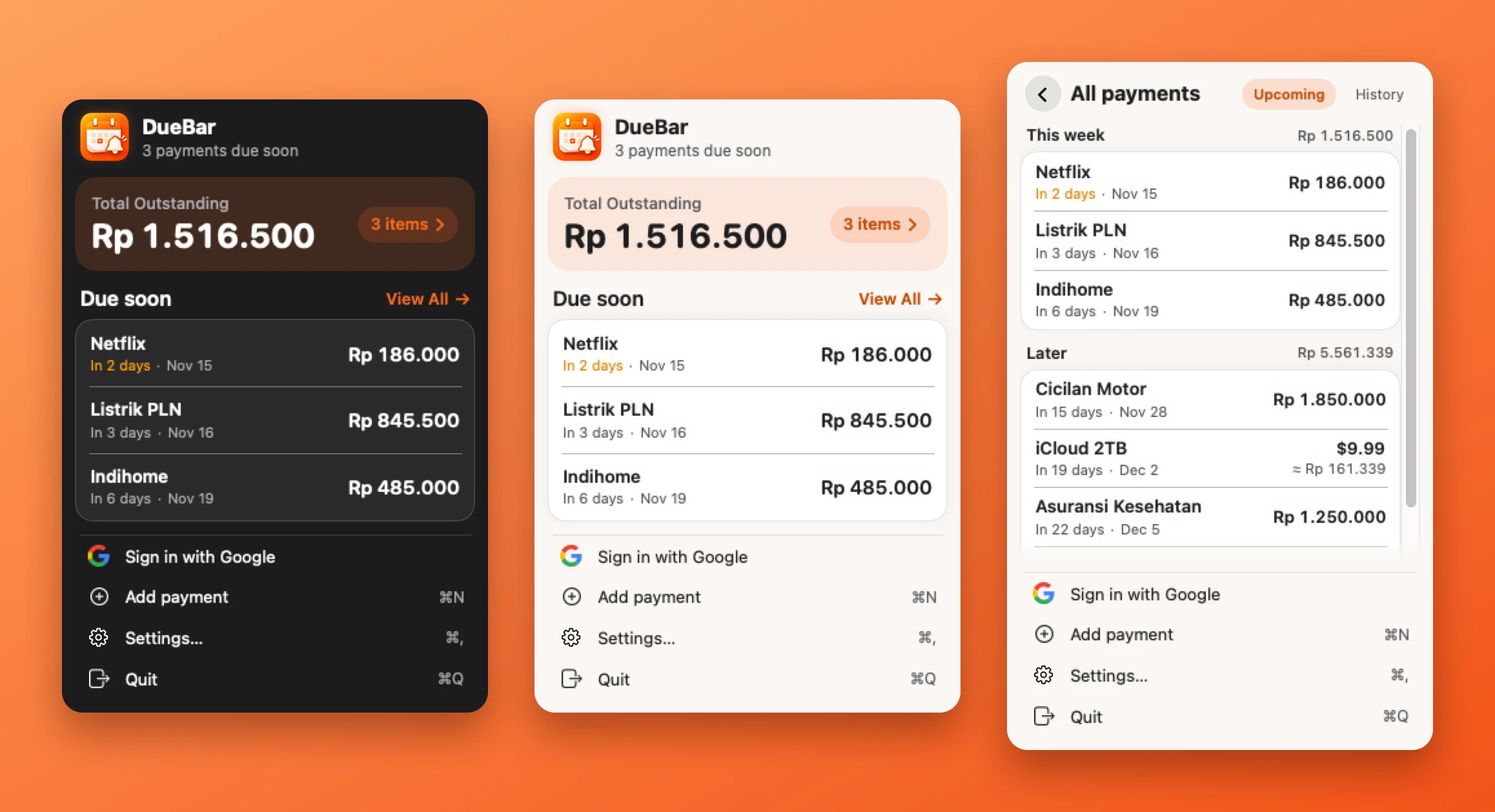
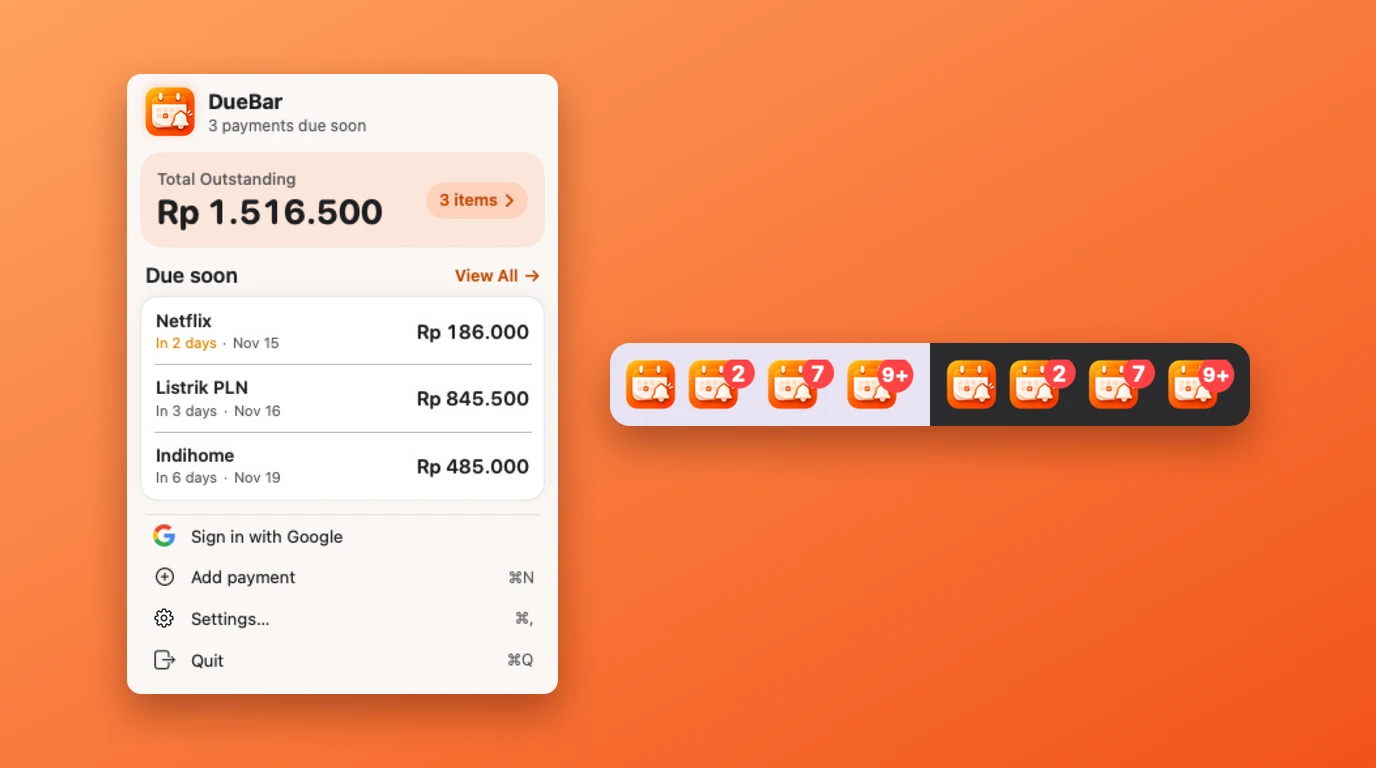
Menu bar hanya berisi logo dengan badge merah: jumlah pembayaran yang terlambat, jatuh tempo hari ini, atau sudah masuk jendela pengingatnya. Dropdown membuka dengan Total Outstanding dalam mata uang utamamu, diikuti beberapa pembayaran yang segera jatuh tempo; sisanya ada di View All.The menu bar is just the logo with a red badge counting what is overdue, due today, or inside its reminder window. The dropdown opens with Total Outstanding in your main currency, then the few payments due soon; the rest is under View All.

Kelola semuanya dari PengaturanManage everything from Settings

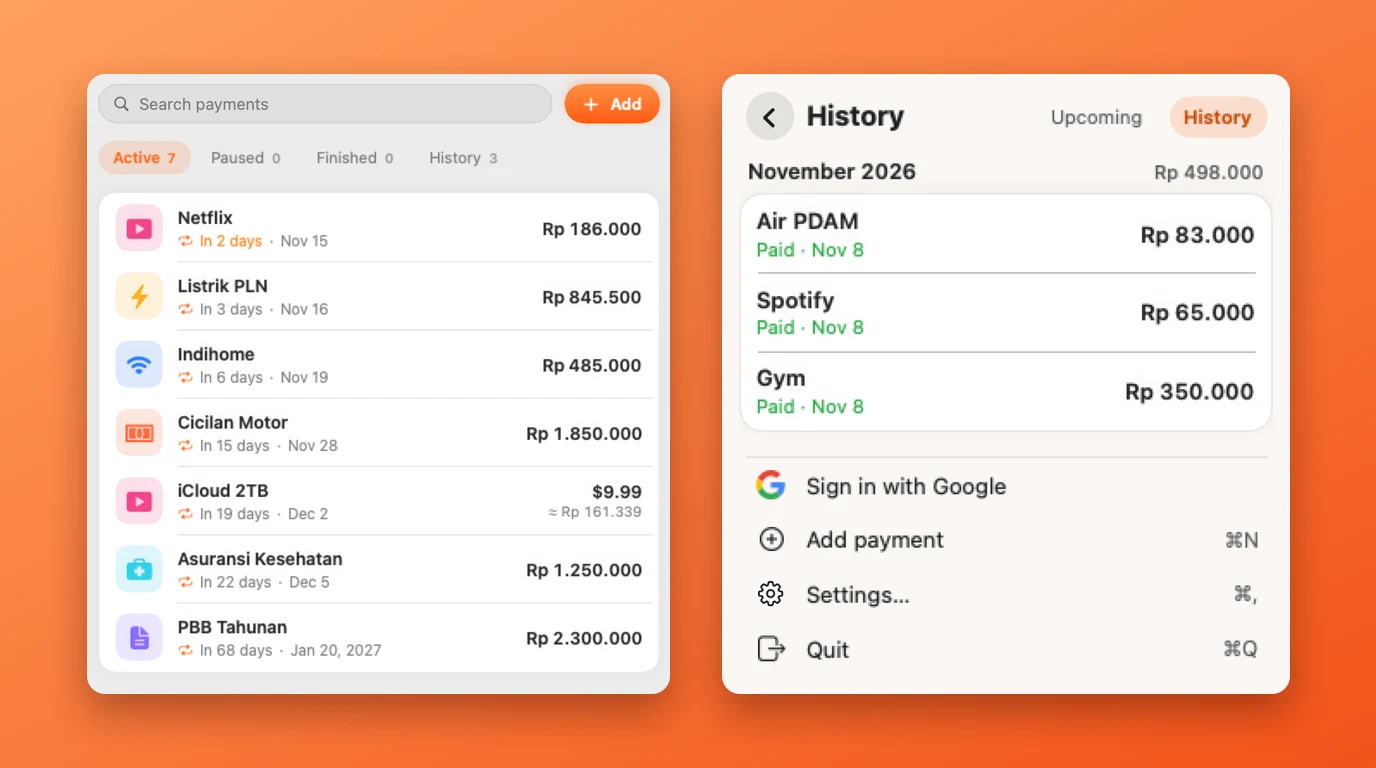
Tab Data memuat semua pembayaran: cari, tambah, ubah, jeda, tandai lunas, atau hapus, lengkap dengan riwayat dan Urungkan. Ekspor CSV, cadangan JSON, tiga tema (Sistem, Terang, Gelap), serta bahasa Indonesia dan English.The Data tab lists every payment: search, add, edit, pause, mark paid or delete, with history and Undo. CSV export, JSON backup, three themes (System, Light, Dark), and English and Bahasa Indonesia.

Kunci dengan password atau Touch IDLock it with a password or Touch ID

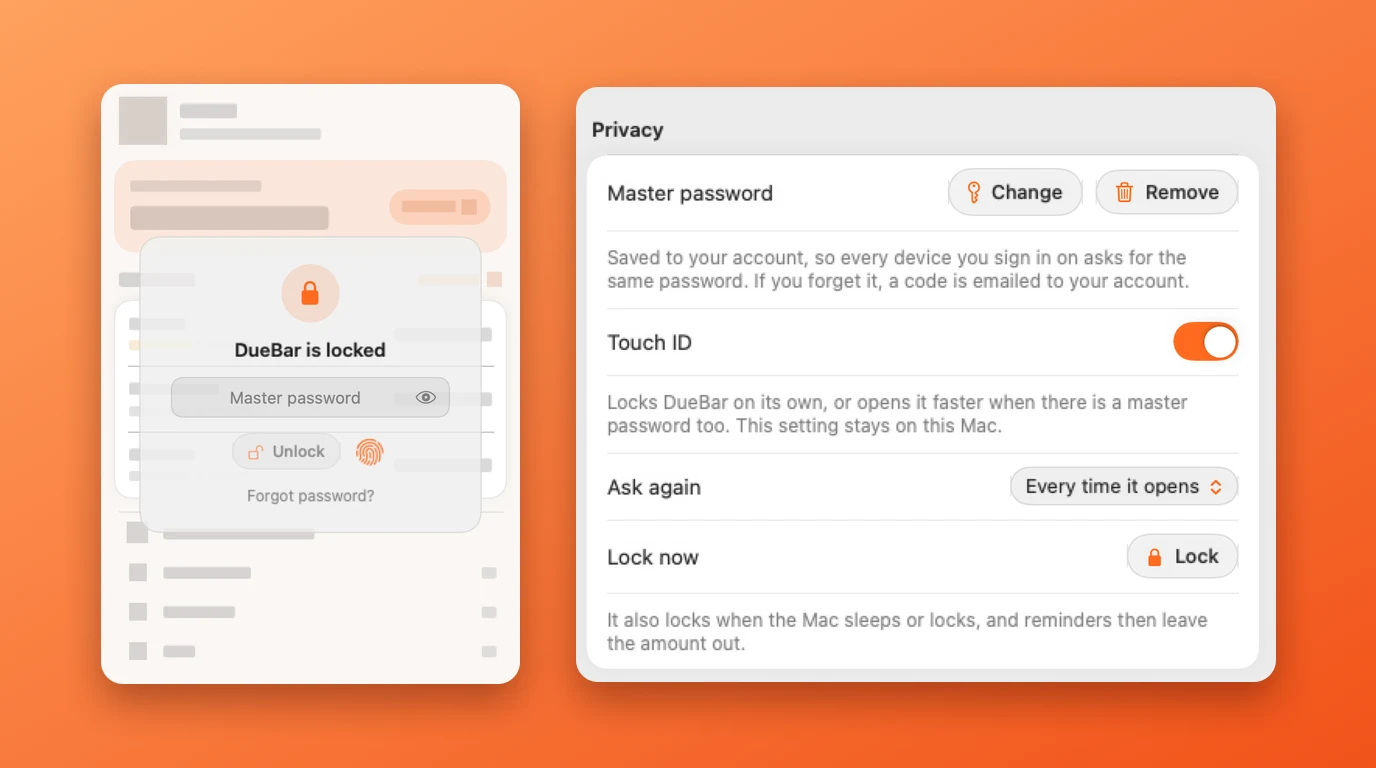
Sembunyikan nama dan nominal di balik password master, Touch ID, atau keduanya. Password disimpan di akunmu sebagai hash agar semua perangkat memakai yang sama; kalau lupa, kode dikirim ke email. Touch ID hanya berlaku di Mac itu. Ini kunci layar, bukan enkripsi berkas.Hide names and amounts behind a master password, Touch ID, or both. The password is saved to your account as a hash so every device uses the same one, and a forgotten one is reset by an emailed code. Touch ID applies to that Mac only. A screen lock, not file encryption.

Cara memasangHow to install

Homebrew adalah cara termudah — satu perintah, tidak ada langkah lain:

Homebrew is the easiest way — one command, nothing else to set up:

brew install --cask ahmadarif-lab/tap/duebar

Perintah ini menambahkan tap ahmadarif-lab/tap dan langsung membersihkan flag karantina, jadi aplikasi terbuka tanpa peringatan Gatekeeper. Lalu buka DueBar dari Applications.

This adds the ahmadarif-lab/tap tap and clears the quarantine flag, so the app opens straight away — no Gatekeeper warning to click through. Then open DueBar from Applications.

  1. Buka DueBar dari Applications. Ikonnya muncul di menu bar; klik lalu Tambah untuk memasukkan pembayaran pertamamu. Mau sinkron antar perangkat? Buka Pengaturan → Akun dan masuk dengan Google.
  2. Lewat installer: unduh DueBar.pkg di atas, buka, lalu ikuti langkahnya; DueBar masuk ke Applications. DMG juga tersedia: buka lalu seret DueBar ke Applications.
  3. DueBar ditandatangani ad-hoc, bukan dengan Developer ID dan dinotarisasi, jadi macOS memperingatkan saat pertama dibuka. Klik kanan installer (atau aplikasinya) lalu pilih Open, atau buka lewat System Settings → Privacy & Security → Open Anyway. Untuk DMG bisa juga lewat Terminal: xattr -dr com.apple.quarantine /Applications/DueBar.app.
  4. Untuk memperbarui: instalasi Homebrew tinggal brew upgrade --cask duebar, atau klik pembaruan yang ditawarkan aplikasi sendiri. Instalasi manual (PKG atau DMG) akan diarahkan ke halaman rilis GitHub.
  1. Open DueBar from Applications. Its icon appears in the menu bar; click it, then Add to enter your first payment. Want sync across devices? Open Settings → Account and sign in with Google.
  2. Via the installer: download DueBar.pkg above, open it and click through; DueBar lands in Applications. A DMG is available too: open it and drag DueBar into Applications.
  3. DueBar is ad-hoc signed rather than signed with a Developer ID and notarized, so macOS warns the first time. Right-click the installer (or the app) and choose Open, or open it once through System Settings → Privacy & Security → Open Anyway. For the DMG you can also clear it from Terminal: xattr -dr com.apple.quarantine /Applications/DueBar.app.
  4. To update: a Homebrew install is just brew upgrade --cask duebar, or click the update prompt the app offers on its own. A manual install (PKG or DMG) opens the GitHub release page instead.

PrivasiPrivacy

DueBar bekerja penuh di Mac-mu. Pembayaranmu tersimpan di satu berkas lokal; tidak ada akun yang wajib dibuat dan tidak ada pelacak, iklan, atau analitik.

DueBar works fully on your Mac. Your payments live in one local file; no account is required and there are no trackers, ads or analytics.

Kunci opsional: password master (hanya hash-nya yang disimpan, di Mac dan, jika kamu masuk, di akunmu) dan Touch ID (pengaturan lokal yang tidak dikirim ke mana pun; DueBar tidak pernah menerima data sidik jari).

The optional lock: a master password (only its hash is stored, on your Mac and, if you sign in, on your account) and Touch ID (a local setting that is never sent anywhere; DueBar never receives fingerprint data).

Data baru dikirim ke server kami hanya jika kamu masuk dengan Google: nama, email, dan tautan foto profil akunmu, serta pembayaran yang kamu buat, untuk disinkronkan ke perangkatmu yang lain. Kamu bisa menghapus akun dan seluruh data cloud kapan saja dari Pengaturan → Akun. Detail lengkap ada di Kebijakan Privasi.

Data reaches our server only if you sign in with Google: your account's name, email and profile photo link, and the payments you create, to sync them to your other devices. You can delete your account and all cloud data at any time from Settings → Account. Full details are in the Privacy Policy.

Kebijakan PrivasiPrivacy Policy · Syarat & KetentuanTerms of Service

Catatan: DueBar adalah pengingat, bukan layanan pembayaran: aplikasi ini tidak menyimpan nomor kartu atau rekening dan tidak memproses transaksi apa pun.

Note: DueBar is a reminder, not a payment service: it never stores card or account numbers and doesn't process any transaction.

Riwayat versiVersion history

Versi lama tetap bisa diunduh. Untuk memastikan berkas tidak berubah, cocokkan SHA-256-nya dengan shasum -a 256 namaberkas.Older versions stay available. To verify a file is unchanged, compare its SHA-256 with shasum -a 256 filename.

v0.1.1

13 November 2026November 13, 2026 TerbaruLatest
  • Kunci opsional: sembunyikan nama dan nominal di balik password master, Touch ID, atau keduanya. Password disimpan di akunmu (sebagai hash) agar semua perangkat memakai yang sama; kalau lupa, kode dikirim ke email akun.
  • Data pembayaran dienkripsi di server.
  • Pengaturan didesain ulang dengan kartu dan kontras yang lebih baik; dropdown lebih jelas.
  • Kini tersedia installer DueBar.pkg di samping DMG.
  • Optional lock: hide names and amounts behind a master password, Touch ID, or both. The password is saved to your account (as a hash) so every device shares it; if you forget it, a code is emailed to your account.
  • Payment data is encrypted on the server.
  • Settings redesigned with cards and better contrast; a clearer dropdown.
  • A DueBar.pkg installer is now available next to the DMG.
DueBar.pkg · universal · 3,6 MB3.6 MB
SHA-256752cf00ec0feb204c85c0e340e39c1d694777b2946d76f7f8b274ccfb99889a0
DueBar.dmg · universal · 4,1 MB4.1 MB
SHA-25602971eeaa751f846d21aeec21d5598dc0b48dc3f8eae75effcefca6f47811996

v0.1.0

13 November 2026November 13, 2026
  • Rilis pertama: pengingat pembayaran di menu bar dengan pengulangan, notifikasi lokal, riwayat, ekspor CSV, dan login Google opsional untuk sinkron antar perangkat.
  • First release: a menu bar payment reminder with repeats, local notifications, history, CSV export, and optional Google sign-in to sync across devices.
DueBar.dmg · universal · 2,1 MB2.1 MB
SHA-2563140bb023d21fd09bb4c3128e8c267cd0d6d284af0c4e7ed454bd965af63c1ea