FiturFeatures

Native, tanpa bw CLINative, no bw CLI

VaultBar berbicara langsung dengan API Bitwarden seperti extension browser, jadi tidak ada CLI atau Node yang perlu dipasang. Mendukung kata sandi master PBKDF2 dan Argon2id, verifikasi dua langkah (authenticator, e-mail, YubiKey), kode perangkat baru, kunci API, dan beberapa akun.VaultBar talks to the Bitwarden API directly, the way the browser extension does, so there is no CLI or Node to install. It supports PBKDF2 and Argon2id master passwords, two-step verification (authenticator, e-mail, YubiKey), the new-device code, API-key login, and several accounts.

Vault lengkap dari menu barA full vault in the menu bar

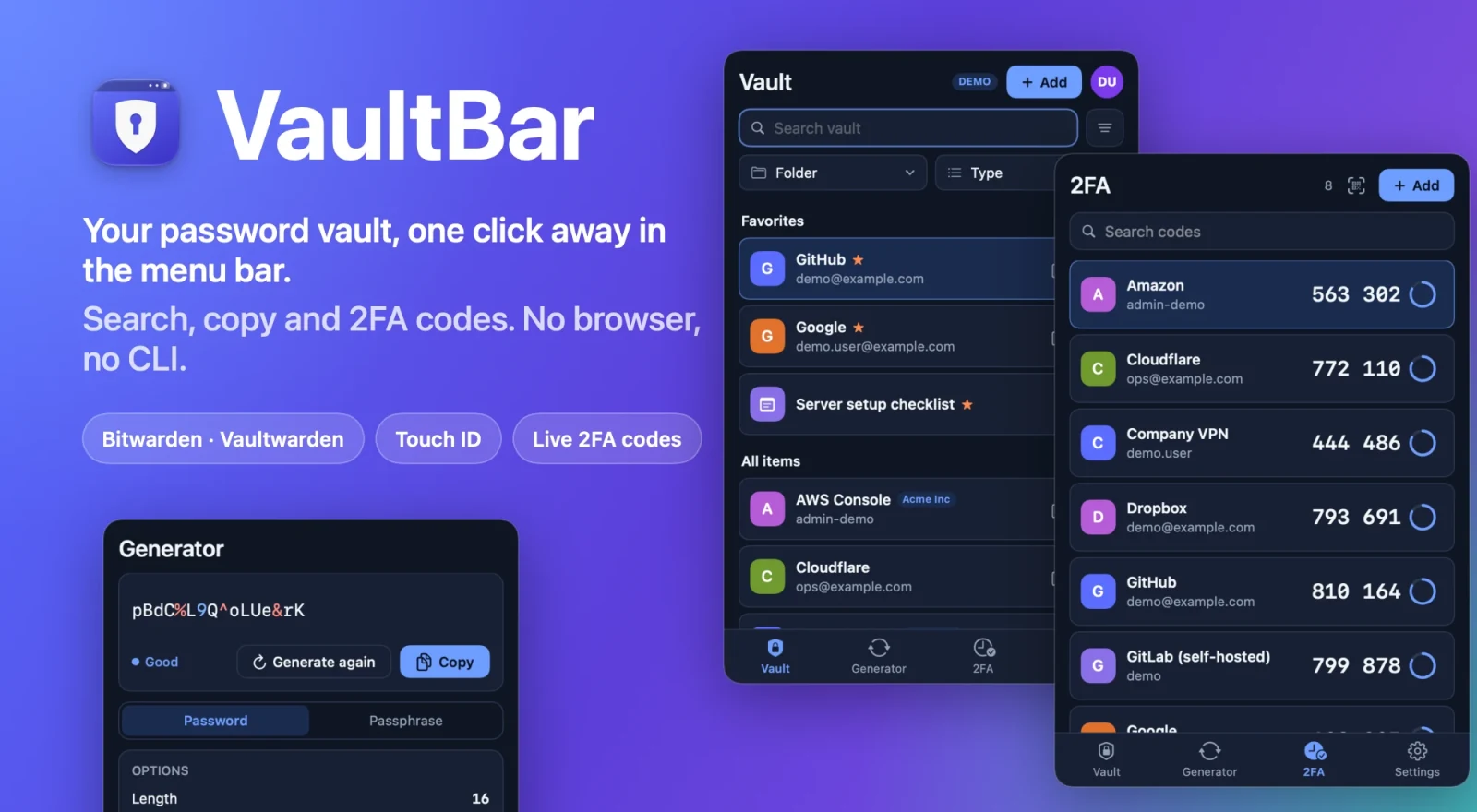
Cari cepat (fuzzy), filter folder dan jenis, favorit, salin username/password/kode, ubah, gandakan, dan hapus (ke trash). Tambah login, kartu, identitas, dan catatan; kelola folder; impor dan ekspor berkas .json Bitwarden. Tampilan mengikuti extension: tab Vault, Generator, 2FA, dan Settings.Fuzzy search, folder and type filters, favorites, copy username/password/code, edit, clone and delete (to the trash). Add logins, cards, identities and notes; manage folders; import and export Bitwarden .json files. The layout follows the extension: Vault, Generator, 2FA and Settings tabs.

Kode 2FA langsung + pindai QRLive 2FA codes + QR scanning

Tab 2FA menampilkan kode TOTP yang dihitung di Mac-mu (kunci base32, tautan otpauth://, dan Steam). Saat situs menampilkan kode QR untuk mendaftar 2FA, pindai dari layar, dari berkas gambar, atau dari screenshot di clipboard; kuncinya, nama, dan username terisi otomatis.The 2FA tab shows TOTP codes computed on your Mac (base32 keys, otpauth:// links and Steam). When a site shows a QR code to enrol in 2FA, scan it from the screen, an image file or a screenshot on the clipboard; the key, name and username are filled in for you.

Ketik otomatis + saran itemAuto-type + suggested items

Seperti autofill extension, tapi sebagai ketikan: VaultBar mengembalikan fokus ke aplikasi sebelumnya lalu mengetik username, Tab, dan password (atau kode 2FA) ke kolom yang aktif, di browser atau aplikasi apa pun, tanpa lewat clipboard. Item yang cocok dengan situs atau aplikasi di depan muncul paling atas, siap dengan ⌘↩.Like the extension's autofill, but as keystrokes: VaultBar hands focus back to the previous app and types the username, Tab and password (or the 2FA code) into the active field, in any browser or app, without touching the clipboard. Items that match the site or app in front appear on top, ready for ⌘↩.

Aman dan privatSecure and private

Touch ID, kunci otomatis (saat idle, tidur, atau popover ditutup), clipboard yang ditandai tersembunyi dan dihapus otomatis, dan tanpa server lokal. Hanya ciphertext yang tertulis di disk. Pembangkit kata sandi dan frasa sandi memakai CSPRNG sistem.Touch ID, auto-lock (on idle, sleep, or when the popover closes), a clipboard that is marked concealed and cleared automatically, and no local server. Only ciphertext is written to disk. The password and passphrase generator uses the system CSPRNG.

Cara memasangHow to install

Homebrew adalah cara termudah — satu perintah, tidak ada langkah lain:

Homebrew is the easiest way — one command, nothing else to set up:

brew install --cask ahmadarif-lab/tap/vaultbar

Perintah ini menambahkan tap ahmadarif-lab/tap dan langsung membersihkan flag karantina, jadi aplikasi terbuka tanpa peringatan Gatekeeper. Lalu buka VaultBar dari Applications.

This adds the ahmadarif-lab/tap tap and clears the quarantine flag, so the app opens straight away — no Gatekeeper warning to click through. Then open VaultBar from Applications.

  1. Buka VaultBar dari Applications, masukkan e-mail lalu Lanjut, pilih server di bagian bawah (bitwarden.com, bitwarden.eu, atau server sendiri), dan masukkan kata sandi master. Ketik otomatis akan meminta izin Aksesibilitas saat pertama dipakai.
  2. Lewat installer: unduh VaultBar.pkg di atas, buka, lalu ikuti langkahnya; VaultBar masuk ke Applications. DMG juga tersedia: buka lalu seret VaultBar ke Applications.
  3. VaultBar ditandatangani ad-hoc, bukan dengan Developer ID dan dinotarisasi, jadi macOS memperingatkan saat pertama dibuka. Klik kanan installer (atau aplikasinya) lalu pilih Open, atau buka lewat System Settings → Privacy & Security → Open Anyway. Untuk DMG bisa juga lewat Terminal: xattr -dr com.apple.quarantine /Applications/VaultBar.app.
  4. Untuk memperbarui: instalasi Homebrew tinggal brew upgrade --cask vaultbar, atau klik pembaruan yang ditawarkan aplikasi sendiri. Instalasi manual (PKG atau DMG) akan diarahkan ke halaman rilis GitHub.
  1. Open VaultBar from Applications, enter your e-mail and Continue, pick the server at the bottom (bitwarden.com, bitwarden.eu or your own), and enter your master password. Auto-type asks for the Accessibility permission the first time you use it.
  2. Via the installer: download VaultBar.pkg above, open it and click through; VaultBar lands in Applications. A DMG is available too: open it and drag VaultBar into Applications.
  3. VaultBar is ad-hoc signed rather than signed with a Developer ID and notarized, so macOS warns the first time. Right-click the installer (or the app) and choose Open, or open it once through System Settings → Privacy & Security → Open Anyway. For the DMG you can also clear it from Terminal: xattr -dr com.apple.quarantine /Applications/VaultBar.app.
  4. To update: a Homebrew install is just brew upgrade --cask vaultbar, or click the update prompt the app offers on its own. A manual install (PKG or DMG) opens the GitHub release page instead.

PrivasiPrivacy

VaultBar tidak punya server dan tidak mengirim data apa pun kepada kami. Aplikasi hanya berbicara dengan server Bitwarden atau Vaultwarden yang kamu pilih sendiri, dan dengan GitHub Releases API saat kamu mengklik Check for updates (tanpa datamu). Tanpa akun VaultBar, tanpa iklan, dan tanpa analitik.

VaultBar runs no server and sends no data to us. The app talks only to the Bitwarden or Vaultwarden server you choose, and to the GitHub Releases API when you click Check for updates (without your data). No VaultBar account, no ads, and no analytics.

Di disk hanya ada ciphertext: cache vault terenkripsi dan kunci yang dibungkus, persis seperti yang disimpan klien resmi, dengan izin akses hanya untuk akunmu. Refresh token ada di Keychain. Kata sandi master dan kunci vault hanya hidup di memori saat vault terbuka; jika kamu mengaktifkan Touch ID, kata sandi master disimpan di Keychain khusus perangkat ini dan hanya dibaca setelah Touch ID.

Only ciphertext lands on disk: the encrypted vault cache and the wrapped key, exactly what the official clients cache, readable only by your account. The refresh token is in the Keychain. The master password and vault key live only in memory while the vault is unlocked; if you turn on Touch ID, the master password sits in a this-device-only Keychain item that is read only after Touch ID.

Saran item membaca aplikasi yang ada di depan, alamat tab aktif browser (lewat AppleScript, dengan izin Otomasi dari macOS), dan judul jendela (izin Aksesibilitas) hanya di memori dan tidak disimpan atau dikirim; fitur ini bisa dimatikan di Settings. Kode QR dibaca di Mac-mu, dan tangkapan layar sementara langsung dihapus.

Suggested items read the app in front, the browser's active tab address (through AppleScript, with macOS's Automation permission) and the window title (Accessibility permission) in memory only, never stored or sent; the feature can be turned off in Settings. QR codes are read on your Mac, and any temporary screen capture is deleted right away.

Kebijakan PrivasiPrivacy Policy · Syarat & KetentuanTerms of Service

Catatan: VaultBar adalah proyek independen dan tidak berafiliasi dengan atau didukung oleh Bitwarden, Inc. Bitwarden adalah merek dagang Bitwarden, Inc.

Note: VaultBar is an independent project and is not affiliated with or endorsed by Bitwarden, Inc. Bitwarden is a trademark of Bitwarden, Inc.

Riwayat versiVersion history

Versi lama tetap bisa diunduh. Untuk memastikan berkas tidak berubah, cocokkan SHA-256-nya dengan shasum -a 256 namaberkas.Older versions stay available. To verify a file is unchanged, compare its SHA-256 with shasum -a 256 filename.

v0.1.0

17 November 2026November 17, 2026 TerbaruLatest
  • Rilis pertama VaultBar: klien menu bar native untuk vault yang kompatibel dengan Bitwarden, tanpa bw CLI.
  • Vault lengkap (cari, salin, ubah, gandakan, hapus, tambah, folder, impor/ekspor), tab 2FA dengan pemindaian kode QR, dan pembangkit kata sandi.
  • Ketik otomatis dengan saran item untuk aplikasi atau situs di depan; Touch ID, kunci otomatis, clipboard yang dihapus otomatis, tema terang/gelap, Inggris dan Indonesia.
  • Tersedia sebagai installer PKG (klik dua kali) dan DMG.
  • First release of VaultBar: a native menu bar client for Bitwarden-compatible vaults, no bw CLI.
  • A full vault (search, copy, edit, clone, delete, add, folders, import/export), a 2FA tab with QR scanning, and a password generator.
  • Auto-type with suggested items for the app or site in front; Touch ID, auto-lock, an auto-cleared clipboard, light/dark theme, English and Indonesian.
  • Available as a PKG installer (double-click) and a DMG.
VaultBar.pkg · universal · 3,9 MB3.9 MB
SHA-2566e63de2808e63beb8d602e0f026deff33f584415ba58b5a83308145b6037c54d
VaultBar.dmg · universal · 4,5 MB4.5 MB
SHA-256006ef8ca0e93e5253f4912c1dae88e7225265e4d7cb50a2ddf520256c652c4a5